

Criminals are sending hotel guests messages that look exactly like they came from the property (real name, real dates, real room type) and asking for a card to “confirm” a booking. Securing your own login only protects the part of the chain you control. Guests also need a way to tell your real messages from the fake ones, regardless of where the data leaked from.
We work closely with hotels dealing with exactly this kind of fallout: confused guests, disputed charges, and a property fielding “is this really you?” calls with no script ready. This article is what we wish more properties had on hand before that happens: how to recognize these scams, how to talk to guests about them, and how to get fake accounts and numbers taken down so fewer guests fall for the next one.
Reading time: about 14 minutes
Quick article summary
-
Attackers are compromising hotel and OTA (online travel agency, the website or app guests use to book) accounts, pulling real reservation data, and using it to message guests directly with convincing “confirm your card” or “complete your upgrade” requests.
-
A message can get every detail right (name, dates, room type, confirmation number) because it’s built from your actual booking record, not guesswork.
-
The fix isn’t only technical. Guests need to hear from you before they hear from the scammer, exactly what your hotel will and won’t ask for.
-
A short pre-arrival message from a verified sender, plus a clear process for when a guest calls asking “is this really you?”, stops most of these attempts cold.
-
A leak can happen at any point in the chain: a channel manager, an OTA account, a hotel mailbox, or the guest’s own inbox, which is exactly why guest-facing prevention matters even on top of securing your own systems.
-
This isn’t happening to one hotel. Hospitality and travel businesses saw a 122% rise in weekly cyberattacks over the past three years, and 2026 research points to AI as the reason attackers can now run these scams faster and at far greater scale.
-
Recognizing a fake message isn’t the finish line. Reporting it to WhatsApp, the Anti-Phishing Working Group, or Google’s phishing form is what actually gets the number or site shut down.
How hotel guest phishing scams actually work
The pattern behind these scams runs in 4 steps:
-
A staff login or a partner account somewhere in the booking chain gets phished or bought on a criminal forum.
-
The attacker uses that access to pull real reservation data.
-
That data goes into a message built to look exactly like your hotel: real name, real dates, real room type, sometimes a real confirmation number.
-
The guest, trusting the accurate details, hands over a card number or clicks a “verification” link.
Step 3 is what makes these messages so convincing, and it’s worth seeing in a real case. In November 2025, the cybersecurity firm Sekoia published a report on a campaign it called “I Paid Twice,” named after the subject line a defrauded traveler used to describe what happened to them. Sekoia found that criminals had compromised hotel and OTA partner accounts, pulled real guest data, and used it to send guests fake payment requests by email and WhatsApp, often claiming a card had failed or a security check was needed. Some guests paid the fake invoice on top of what they’d already paid the hotel. The operator behind this specific campaign, initially focused on one platform, expanded during 2025 to buy and use stolen account data from several other major OTAs as well.
This isn’t limited to one company’s systems. Security researchers at Netcraft tracked a campaign in late 2025 that had registered more than 4,300 phishing domains built to impersonate several different booking and rental platforms at once, evidence that scammers are deliberately targeting the whole category, not one brand. A few individual platforms have confirmed their own incidents during this period too. Microsoft’s threat intelligence team flagged a pattern in March 2025 involving fake booking-platform emails sent to hotel staff, designed to trick them into installing information-stealing malware. In April 2026, Booking.com confirmed that unauthorized third parties had accessed guest names, email addresses, phone numbers, and booking details after compromising hotel partner accounts, and said financial data was not affected for most guests.
It’s a repeatable pipeline that has now touched most of the major names in online travel, and 2026 research shows why it’s accelerating. Check Point Research tracked cyberattacks against the hospitality, travel, and recreation sector heading into the 2026 summer travel season. Weekly attack volume per organization rose from 1,032 in May 2023 to 2,291 in May 2026, an increase of 122% over three years.
Table 1. Cyberattack growth: hospitality and travel vs. all industries
|
Targeted sector by cyberattack |
Year-over-year increase in cyberattacks, May 2025 to May 2026 |
|---|---|
|
Hospitality, travel, and recreation |
24% |
|
All industries combined |
2% |
Check Point also found 47,318 new travel-related website domains registered in May 2026 alone, up 33% from the previous month, with roughly 1 in every 112 already flagged as malicious or suspicious before being used in an active scam. Within that data, researchers identified a single campaign that had registered more than 210 sequentially numbered hotel-lure domains (following patterns like hotel-stay[number].com), built and ready to activate at scale rather than one at a time by hand. That pattern, hundreds of near-identical fake domains prepared in advance, is what automated, bot-driven scam infrastructure looks like in practice.
The security vendor WatchGuard reached a similar conclusion in its own hospitality-focused analysis published in August 2026: artificial intelligence hasn’t created a new kind of attack on hotels; it has made the existing ones (phishing, credential theft, social engineering) faster to run and easier to personalize at scale. Their research also points to where the underlying weakness usually sits: the same report found that a large share of employees across the workforce reuse passwords, use AI tools their employer hasn’t approved, and receive phishing awareness training only once a year or never.
What every hotel can do is help guests recognize a fake message and remember what a genuine one looks like, before the next attempt reaches their inbox. That’s the part of this problem where a few honest sentences from you can really help your guests, and it’s what the rest of this article focuses on.
Where the data leaks, and why securing your login isn’t enough
Guests assume a message referencing their real booking must have come from somewhere trustworthy. In practice, that data passes through several hands between booking and check-in, and a leak at any one of them is enough to make a scam message convincing. The main paths, in roughly the order they show up in real cases:
-
A channel manager or PMS login. (PMS stands for property management system, the core software your hotel runs bookings on.) One set of stolen credentials can expose reservation data across every property connected to that account, not just one hotel.
-
A compromised partner account. Security researchers have traced large-scale phishing campaigns to stolen partner logins across several major OTAs, bought and sold on cybercrime forums for as little as a few dollars each.
-
A hotel mailbox. Reservations inboxes are public-facing by design, which makes them a common entry point for the malicious emails that start the whole chain.
-
The guest’s own inbox or reused password. If a guest’s email account is compromised, or they reused a password that leaked elsewhere, their own booking confirmations become readable to whoever has access.
These four are different points in the same connected chain, and a leak at any single one is enough to make a scam message look convincing. That’s exactly why guest-facing prevention matters so much in 2026, even alongside securing your own systems.
Most advice aimed at hotels stops at that second part: multi-factor authentication, unique passwords, staff training on suspicious emails. That’s necessary, and worth doing regardless (see the checklist in the next section). But it only protects the part of the chain your hotel controls. Your guests don’t know which system was compromised. They only know a message arrived that looks like it’s from your hotel. That’s the gap the rest of this article is about: giving guests a reliable way to tell your real communication from an impersonation, regardless of where the data leaked from.
What a hotel phishing scam message looks like
Two patterns show up again and again.
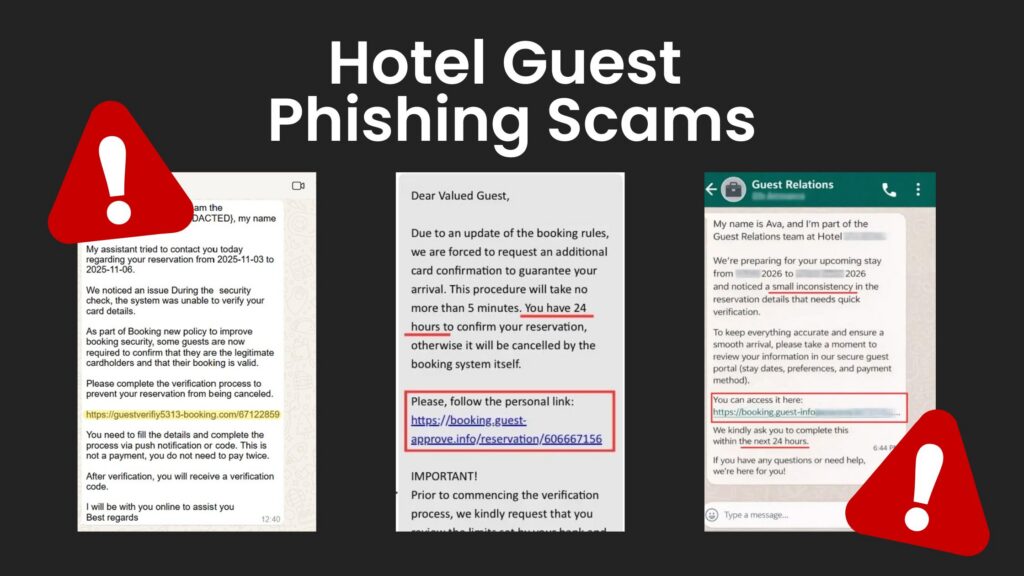
A WhatsApp message from “Guest Relations” names a real staff role, references the guest’s actual stay dates, and claims a small inconsistency in the booking needs quick verification through a “secure guest portal” link. The message sets a short deadline, commonly within 24 hours, to discourage the guest from taking time to check.
An email asking for an additional card confirmation cites an update to booking rules, claims the process takes only a few minutes, and includes a link to a page that asks for full card details. Some versions add a detail meant to sound reassuring: that a small test charge will be refunded within seconds. That reassurance is itself part of the manipulation. A real hotel doesn’t need to run a test charge to confirm a reservation that’s already booked.
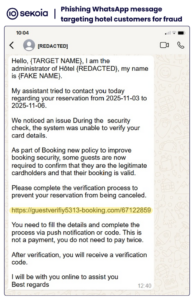 Image from SEKOIA
How to spot a fake hotel booking message
The clearest way to spot a fake is to compare it directly with what your hotel actually does:
Table 2. Genuine hotel communication vs. a scam message, signal by signal
|
Signal |
What a genuine message from your hotel does |
What the scam does |
|---|---|---|
|
Deadline |
No artificial countdown tied to whether the booking stays valid |
Sets a tight deadline: “within 24 hours,” “immediately” |
|
Payment details |
Already has the card on file; won’t ask for the full number and CVV (the 3-digit security code) again |
Asks for a full card number and CVV by link, chat, or phone |
|
Upgrades |
A genuine upgrade offer never requires re-entering full card details |
Offers an unsolicited upgrade in exchange for re-entering card details |
|
The stated problem |
Cites something specific (a date mismatch, a named charge) if there’s a real issue |
Mentions a vague “small inconsistency” that needs quick fixing |
|
First contact channel |
Uses a channel the guest already opted into |
Arrives on WhatsApp from a number the guest never messaged first |
|
Links |
The link goes to your hotel’s actual website domain |
The link domain doesn’t match. Check by hovering or long-pressing, not by the button text |
|
“Verification” charges |
Never runs a charge-and-refund cycle to confirm a booking |
Claims a small test charge will be refunded within seconds |
The single most useful habit you can hand a guest: verify through a channel you already gave them, not a channel the message gave them. If they’re unsure, they should call the number on your website, not the number in the suspicious message, or check their booking directly through your booking engine or the OTA they used.
How to report a phishing message and get it taken down
Recognizing a fake message is the first step. Reporting it is what actually gets the number, account, or website shut down before it reaches the next guest. Share this with guests too. Most people who receive one of these messages never report it anywhere.
One thing this section is not about: who is responsible for a data leak somewhere upstream. Nothing here is a suggestion that a guest report the hotel, or any partner, to the police or any authority. This is purely about shutting down the specific scam message, number, or website in front of them right now.
If the scam arrived by email:
-
Don’t click any link, don’t reply, and don’t open any attachment. If a link was already clicked but no information entered on the page it opened, just close the page and don’t go back to it.
-
Use your email provider’s own “report phishing” or “report spam” button, not just delete. That single click removes the message and feeds your provider’s spam filters so similar messages are more likely to be caught automatically next time. Also forward the email to [email protected], which reaches the wider anti-phishing clearinghouse in Table 3 below.
-
Block the sender’s address in your email client. This won’t stop a scammer from sending from a new address next time, but it closes this one immediately.
If the scam arrived by WhatsApp:
-
Don’t reply, don’t tap any link, and don’t call any number the message gave you.
-
Open the contact’s profile and choose Report (some versions show Block and Report). If the account is impersonating a real business, a hotel, or an OTA using its name and logo, choose impersonation as the reason where that option is offered. WhatsApp treats business impersonation as a fast-tracked policy violation, not ordinary spam.
-
Blocking is usually bundled into the same step as reporting. A new number can always be used for the next attempt, but the report itself is what eventually gets a repeat offender’s account suspended, rather than just hidden from one person.
Table 3. Other places to report a scam, beyond email and WhatsApp
|
Where the message appeared |
Report to |
What that report actually does |
|---|---|---|
|
Fake website or “guest portal” link |
Google’s phishing report form at safebrowsing.google.com/safebrowsing/report_phish. For the website itself, ask whoever manages your hotel’s website or IT to trace who is hosting the fake page and report it to them directly |
Gets browsers to warn other visitors, and can get the page taken offline at the hosting level |
|
Message impersonating an OTA (Expedia, Agoda, Airbnb, etc.) |
The OTA’s own fraud or security reporting channel, in their help center |
Lets the platform investigate the compromised account on their side |
|
Guest lost money |
Their card issuer, plus a national reporting body (e.g. IC3 in the US, or the country-specific bodies in Table 4 below for DACH and European guests) |
Enables a fraud investigation and gives the guest a chance to recover the charge |
None of these reports are guaranteed to get an instant response. But every one of them feeds a system that gets faster at flagging repeat infrastructure the more people use it, and forwarding a scam email takes less time than reading this table did.
Since many of the hotels reading this are based in DACH (Germany, Austria, Switzerland) and elsewhere in Europe, it’s worth knowing exactly where a guest in one of these countries should go, rather than a generic “contact your local authority.”
Table 4. National phishing and fraud reporting contacts, DACH, Italy, and the UK
|
Country |
Where to report |
What it’s for |
|---|---|---|
|
Germany |
BSI (Federal Office for Information Security) at [email protected], or the Verbraucherzentrale’s Phishing-Radar at [email protected] |
Forwarding suspicious emails for review; the Verbraucherzentrale also publishes public warnings about active scams |
|
Austria |
Watchlist Internet, an information and reporting platform backed by Austrian consumer and government bodies |
Reporting a suspicious message and checking whether a scam pattern is already known |
|
Switzerland |
The National Cyber Security Centre (NCSC), or forwarding phishing emails to [email protected] |
Reporting incidents so the NCSC can request takedowns and track trends; report financial loss to local police separately |
|
Italy |
Formal reports of phishing and other online crimes to Italy’s postal and communications police |
|
|
United Kingdom |
Report Fraud (the UK’s national service, or by phone at 0300 123 2040), which replaced Action Fraud in late 2025 |
The national reporting service for fraud and cybercrime in England, Wales, and Northern Ireland; Scotland reports to Police Scotland on 101 |
How hotels can protect guests from phishing scams
Tell guests, before they hear from a scammer, what you will and won’t ask for. State plainly that your hotel will never ask for a full card number and CVV by email, text, or WhatsApp after a booking is confirmed, and that you don’t run “verification” charges. Say this once, clearly, ahead of arrival, not buried in a long confirmation email.
Give guests one verified way to check anything that looks off. A phone number and email address on your official website, stated in your pre-arrival communication, is enough. The point isn’t to add a security layer. It’s to give the guest somewhere to go instead of the link in the suspicious message.
Prepare your front desk and reservations team for the “is this really you?” call. These calls will happen. Staff need a short, confident script: confirm what the hotel actually sent (if anything), confirm what it never asks for, and log the report so you can spot a pattern if several guests describe the same message.
Treat a guest report as a signal, not a one-off. If more than one guest describes a similar message, that’s worth escalating: to your OTA, your channel manager, or your PMS provider, and, if payment details were involved, worth telling affected guests to contact their bank.
Keep your own accounts locked down, too. This is a separate layer, not a substitute for guest communication, and it reduces the chance that your hotel becomes the source of the leaked data in the first place:
-
Turn on multi-factor authentication (MFA) on every account that supports it: your PMS, channel manager, booking engine, and OTA extranet, not just admin logins.
-
Always reach a login page through a saved bookmark, never through a search result or a link in an email. Attackers buy ads and register look-alike domains specifically to catch staff searching for “[system] login.”
-
Use a unique password for every system, ideally through a password manager, so a leak on one account can’t be reused to get into another.
-
Avoid shared logins like [email protected] for critical systems. Give each staff member their own account, so if something goes wrong, you can see exactly which login was compromised.
None of this requires new technology. It requires saying the right thing to guests before the scammer does, and having a process ready for when a guest asks.
What to do if a guest reports a phishing scam
Once you know or suspect guests are being targeted, here’s who does what:
Table 5. Possible incident response by step and owner
|
Step |
What to do |
Who owns it |
|---|---|---|
|
Log the report in detail |
Capture the channel (email, SMS, WhatsApp), sender address or number, the exact ask, and whether the guest lost money |
Whoever takes the call (front desk or reservations) |
|
Check whether it’s isolated or spreading |
Ask the wider team if anyone else has heard something similar in the last few days |
Duty manager |
|
Warn upcoming guests before they’re targeted |
If a batch of reservation data may be exposed, message those guests directly. Don’t wait for the first complaint |
Whoever sends guest communications |
|
Tell your hotel software, OTA, PMS, or channel manager provider |
Report the pattern so they can investigate their own side of the leak |
General manager or IT contact |
|
Point affected guests to their bank |
Your hotel can confirm what’s genuine, but only the card issuer can freeze a card or reverse a charge |
Front desk or reservations |
|
Keep guest-facing language honest |
Say what you’re doing about it; don’t promise guest data is “100% safe” going forward. Nobody in this chain can honestly say that |
Whoever drafts the guest communication |
Start with the pre-arrival message to protect your guests from phishing
If nothing else in this article makes it into practice, the pre-arrival message below does the most work for the least effort. It takes about 10 minutes to adapt, and it’s the one thing standing between your next guest and a message that already has their name, dates, and room type right.
Sent a few days before arrival, from an address guests can recognize as genuinely yours:
Subject: Important: how we’ll actually contact you before your stay
Hi [Guest name],
We’re looking forward to your stay from [check-in date]. One quick note before you arrive.
We will never ask you to re-enter your full card number or CVV by email, text, or WhatsApp to “confirm,” “verify,” or “unlock” your booking. If you receive a message like that claiming to be from us, please don’t click the link or reply with any payment details.
If anything about a message seems off, call us directly at [official phone number] or email [official email address], both listed on our website at [hotel website], and we’ll confirm whether it’s genuine.
See you soon, [Hotel name]
Keep it short. The goal is for the guest to remember one sentence: we won’t ask for your card again, not a full security briefing.
The reporting habits, the incident-response steps, keeping your own logins locked down: all of it adds another layer on top. None of it needs to wait for an OTA, a software vendor, or anyone else in the chain to move first. A hotel that sends one honest line before arrival protects its guests today, regardless of where the next leak happens or whose name is on it.
If you want that message reaching every upcoming guest without depending on who opens a long confirmation email, that’s exactly the kind of thing our Seekda Mass Messaging email tool is built for. It’s part of Seekda Guest, our set of guest experience tools, and it sends the same verified message by email to everyone arriving in a given window, from an address guests already recognize as yours.
Frequently Asked Questions about Hotel Guest Phishing Scams
- Does this only happen to guests who booked through an OTA? No. The data can leak from an OTA account, a channel manager, a compromised hotel mailbox, or the guest’s own inbox. The message can still look like it’s from your hotel regardless of where the leak happened, which is why guest-facing prevention matters alongside securing your own systems.
- Should we tell guests we’ve had a data incident, even if we’re not sure? If you have reason to believe guest data specific to your property was exposed, tell affected guests directly and plainly, and tell them what to watch for. If you’re not sure but have received multiple reports of suspicious messages referencing real bookings, it’s reasonable to send a general caution to upcoming guests without claiming a confirmed breach you haven’t verified.
- Is a “test charge that refunds in five seconds” ever legitimate? No genuine hotel verification process needs to run a charge and refund it within seconds to confirm a reservation you’ve already booked. Treat this specific claim as a red flag on its own.
- What should we do if a guest tells us they already entered card details on a fake site? Tell them to contact their card issuer immediately using the number on the back of the card, to freeze the card and dispute any charge, and to change the password on any account where they reused it. Your hotel can’t reverse the transaction, but a fast call to the bank often can.
- Can a phishing message really include our guest’s correct confirmation number? Yes, if the attacker has pulled that reservation from a compromised account somewhere in the booking chain. A correct confirmation number is not proof a message is genuine. It’s proof the attacker has real data, which is exactly what makes these messages harder to spot than a generic scam.
- Is WhatsApp itself unsafe for guest communication? No. Plenty of hotels use WhatsApp for genuine guest service. The risk is specifically an unsolicited message on WhatsApp that guests never gave that number to first, asking for payment or account details. If your hotel does use WhatsApp for guest communication, say so clearly in your pre-arrival message, so guests know what to expect and what shouldn’t happen there.
- What if the scam keeps coming from different email addresses or numbers after I block one? That’s common, since blocking and reporting closes one sender, not the whole operation. Keep reporting each new one the same way. Each report adds to the pattern data that email providers, WhatsApp, and the Anti-Phishing Working Group use to recognize and block the wider campaign, even though it can feel like you’re not making progress against any single message.